Best Time Tracker App forProductivity & Work Hours
Boost your productivity with WorkHours — the easiest time tracking software to track billable hours, manage work schedules, and export professional timesheets. Perfect for freelancers, consultants, contractors, and remote workers who need reliable project time tracking.
Powerful Time Tracking Features for Every Professional
Everything you need to track billable hours, manage employee time, generate professional timesheets, and boost your productivity. Perfect for freelancers, consultants, contractors, remote workers, and small businesses who need reliable time clock software.
Multi-Job Support with Parallel Timers (PRO)
Track multiple jobs at the same time with independent parallel timers. Switch between jobs instantly and keep every session organized.
Clock-Out Reminders
Get notification reminders to help you remember to clock out, including on your lock screen. You can cancel or disable reminders anytime in settings.
Simple Work Hour Tracking
Start and stop time tracking sessions with a single tap. All your work hours are stored securely and organized automatically for effortless time management.
Export to PDF, CSV & Excel (PRO)
Download your work sessions for invoicing, reporting, or sharing. Perfect for freelancers and consultants who need professional timesheets.
Visual Reports & Analytics
Understand your work patterns and improve your productivity with beautiful charts and detailed analytics of your time tracking data.
Privacy-First Design
No ads, no tracking, your data stays yours. We prioritize your privacy with secure, encrypted data storage and complete user control.
Custom Date Range Filters (PRO)
Drill into specific time periods and get exactly the data you need. Filter by days, weeks, months, or custom date ranges.
Works Offline
Track your time even without internet connection. All sessions are saved locally and sync automatically when you're back online.
See WorkHours in Action
Take a look at our time tracking app screenshots from the App Store and Google Play. Experience the simplicity and power of professional time management.
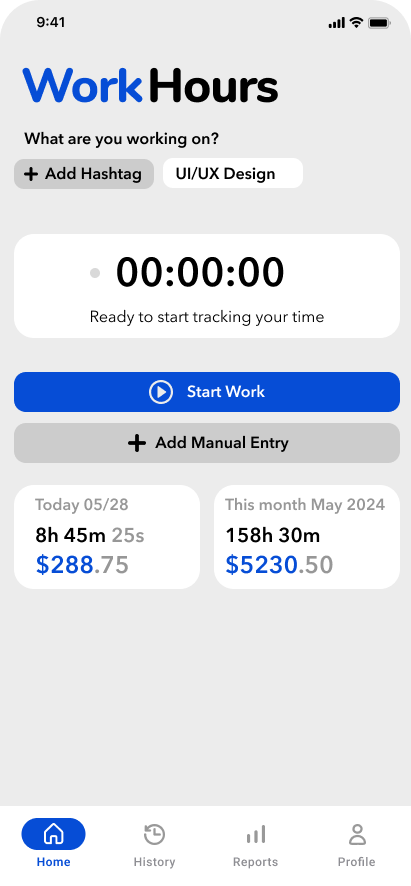
Clean & Intuitive Dashboard
Simple one-tap time tracking with clear visual feedback
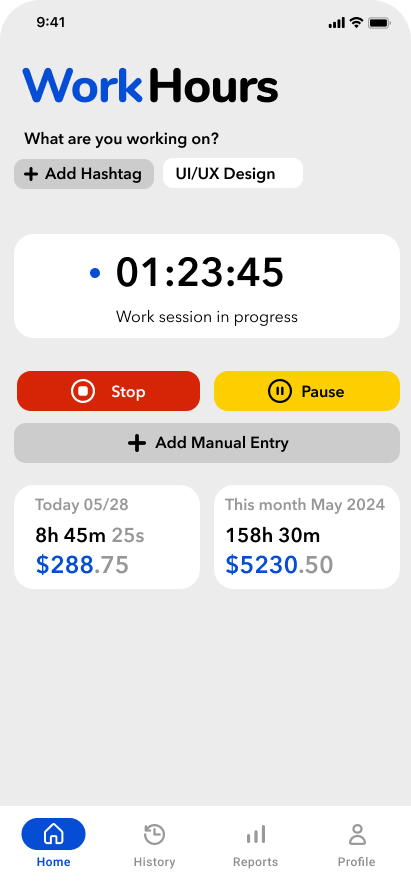
Time Tracking Session in Progress
Real-time session tracking with pause and resume functionality
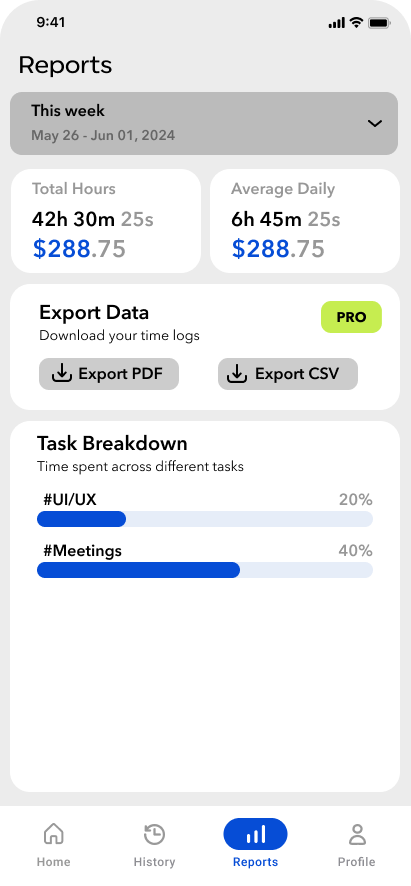
Work Hours Reports and Analytics
Visual charts and analytics to understand your work patterns
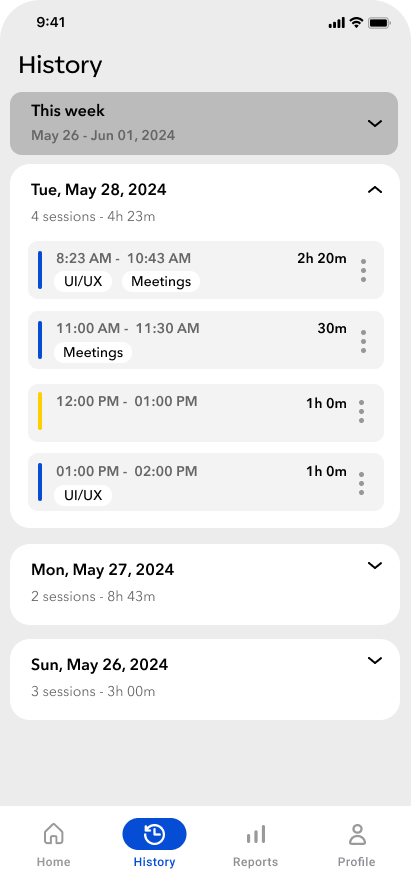
WorkHours Sessions History and Time Tracking Records
Complete history of all your work sessions with detailed time records
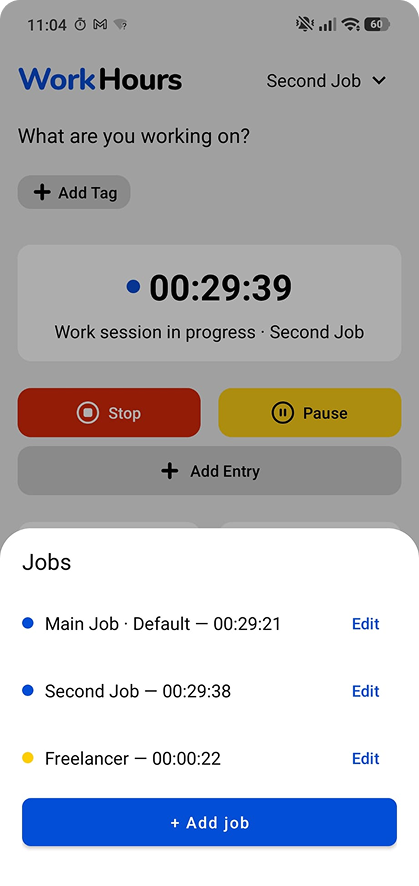
Multi-Job Support with Parallel Timers
Run independent timers for each job at the same time
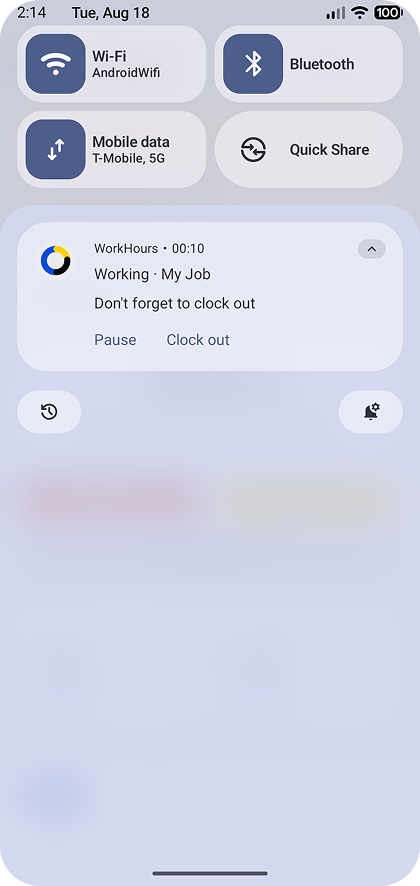
Clock-Out Notification Reminders
Reminders to clock out, with option to cancel in settings
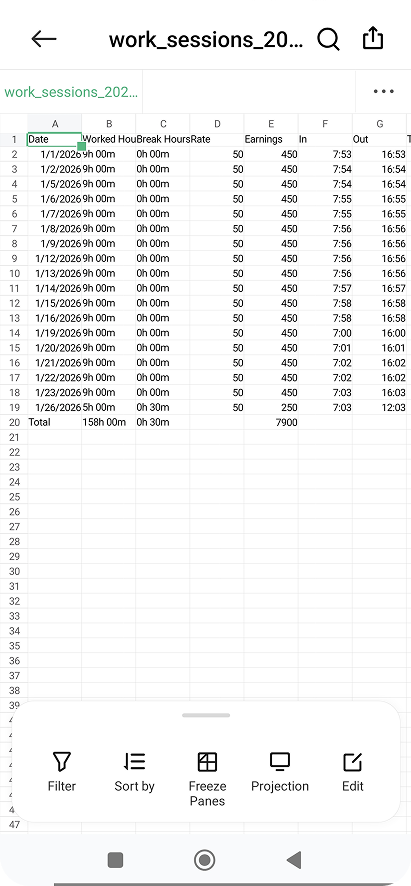
Excel Timesheet Export
Export work sessions to Excel with hours, breaks, rates, and earnings
Ready to boost your productivity? Download WorkHours now!
Simple, transparent pricing plans
Choose the plan that works best for you
Free
Perfect for getting started
- Time tracking
- Hashtag organization
- Weekly & monthly reports
- Clock-out reminders
- Export reports (PDF, CSV, Excel)
- Custom date reports
- Multi-job support with parallel timers
- Priority support
Pro
For professionals who need more
- Time tracking
- Hashtag organization
- Weekly & monthly reports
- Clock-out reminders
- Export reports (PDF, CSV, Excel)
- Custom date reports
- Multi-job support with parallel timers
- Priority support
Reviews
Check out real reviews from customers using WorkHours and see how they manage their time efficiently.
“Finally, a time tracking app that actually works! WorkHours makes it so easy to track my freelance hours. The PDF export feature is perfect for client invoicing. Highly recommend for any freelancer!”

Sarah T.
Freelance Marketing Consultant
“As a remote developer, I needed accurate time tracking for multiple projects. WorkHours delivers exactly what I need - simple, reliable, and privacy-focused. The reports help me understand my productivity patterns.”

Rajesh P.
Remote Software Engineer
“Managing time across different projects was chaotic until I found WorkHours. The custom date filters and visual reports give me complete control over my time tracking. Game-changer for project management!”

Li Mei
Project Manager & Consultant
Frequently Asked Questions
Everything you need to know about WorkHours time tracking app.
Yes! WorkHours offers a free forever plan with core time tracking features including one-tap tracking, hashtag organization, weekly/monthly reports, and clock-out reminders. The Pro plan at only $1/month unlocks PDF/CSV/Excel export, custom date range reports, and multi-job support with parallel timers.
Yes, WorkHours works completely offline. All your time tracking sessions are saved locally on your device and available anytime, anywhere — no internet connection required.
Yes. WorkHours Pro includes multi-job support with parallel timers, so you can track several jobs at once and switch between them instantly.
Yes. WorkHours can send notification reminders to help you remember to clock out, including on your lock screen. You can cancel or disable these notifications anytime in settings.
Yes, with WorkHours Pro ($1/month) you can export your time tracking data to PDF, CSV, and Excel formats, perfect for invoicing clients, sharing reports with managers, and keeping records.
Absolutely. WorkHours is designed with privacy-first principles. We don't show ads, we don't track you, and your data stays on your device. You have complete control over your information.
WorkHours is perfect for freelancers, consultants, contractors, remote workers, employees, entrepreneurs, and anyone who needs to track their work hours accurately. It's simple enough for individuals yet powerful enough for professionals managing multiple projects.
WorkHours is available on iPhone and iPad via the Apple App Store and on Android via the Google Play Store. The app supports 14 languages including English, Spanish, French, German, Italian, Portuguese, Japanese, Korean, Chinese, Arabic, Hebrew, Dutch, Polish, and Turkish.
WorkHours Pro costs only $1 per month. It unlocks premium features including PDF, CSV, and Excel export, custom date range reports, multi-job support with parallel timers, and priority support. The free plan includes core time tracking, hashtag organization, weekly/monthly reports, and clock-out reminders.
Still have questions? We're happy to help.
Latest from Our Blog
Expert tips on time tracking, productivity, and freelancing to help you work smarter.
How to Track Freelance Hours: Complete Guide 2026
Learn the best methods and tools for tracking your freelance work hours. Discover how accurate time tracking can boost your income and improve client relationships.
Read More →Time Tracking for Remote Workers: Best Practices for 2026
Master remote work time management with proven strategies. Learn how to track hours effectively, maintain work-life balance, and boost productivity while working from home.
Read More →5 Time Tracking Mistakes That Cost You Money in 2026
Avoid these common time tracking errors that lead to lost income, inaccurate billing, and poor productivity insights. Learn how to track time the right way.
Read More →Start Your Free Time TrackingJourney Today!
Join professionals who trust WorkHours for accurate time tracking and billable hours management. Download our free time tracker app from the App Store and Google Play and start tracking your work hours instantly!